Project management for ops and engineering.
One Drive for the whole team. Operations work and engineering work in the same kanban, with Forge AI scaffolding the parts you'd otherwise skip.
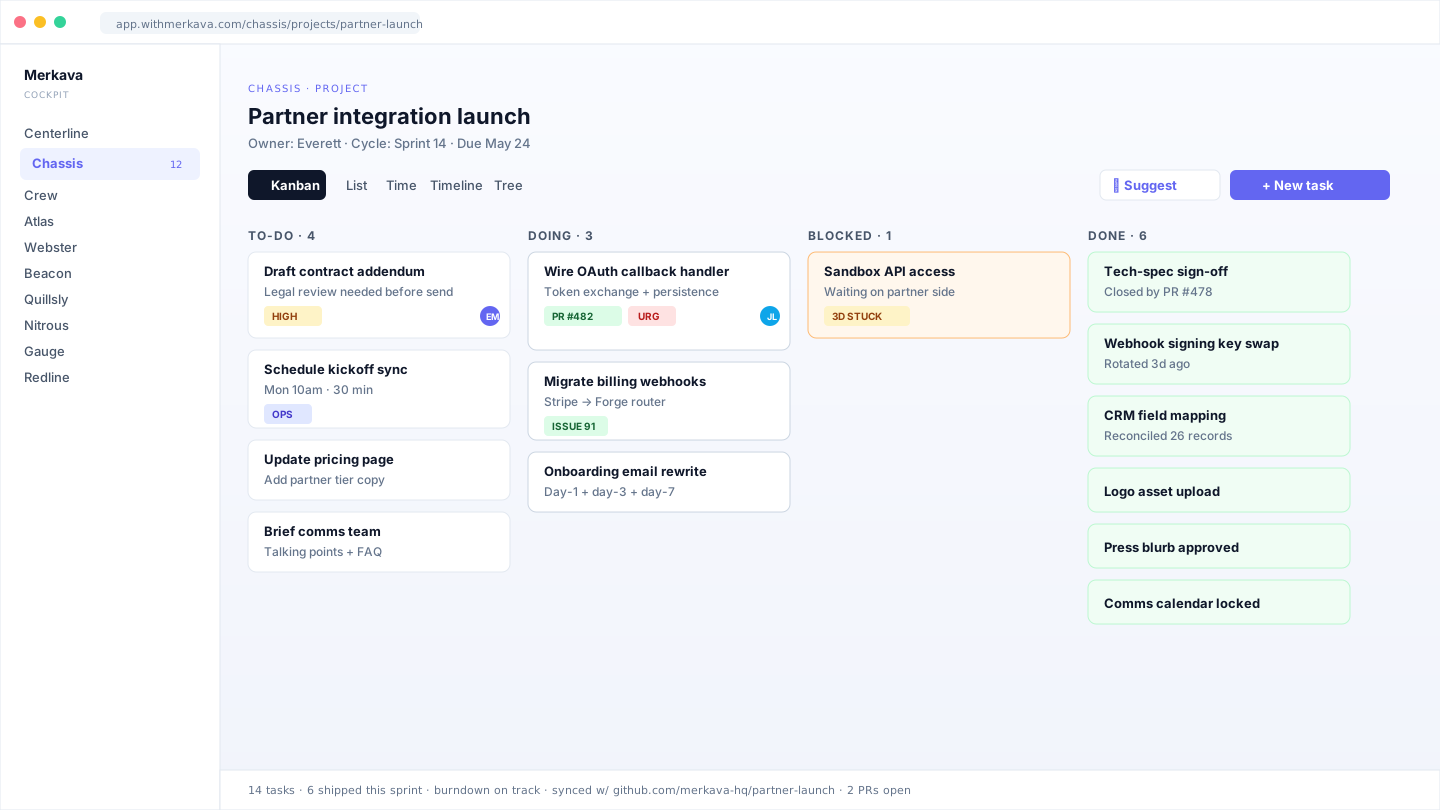
One Drive, four ways to see your work.
Same project, same data. Pick the view that matches the question you're answering.
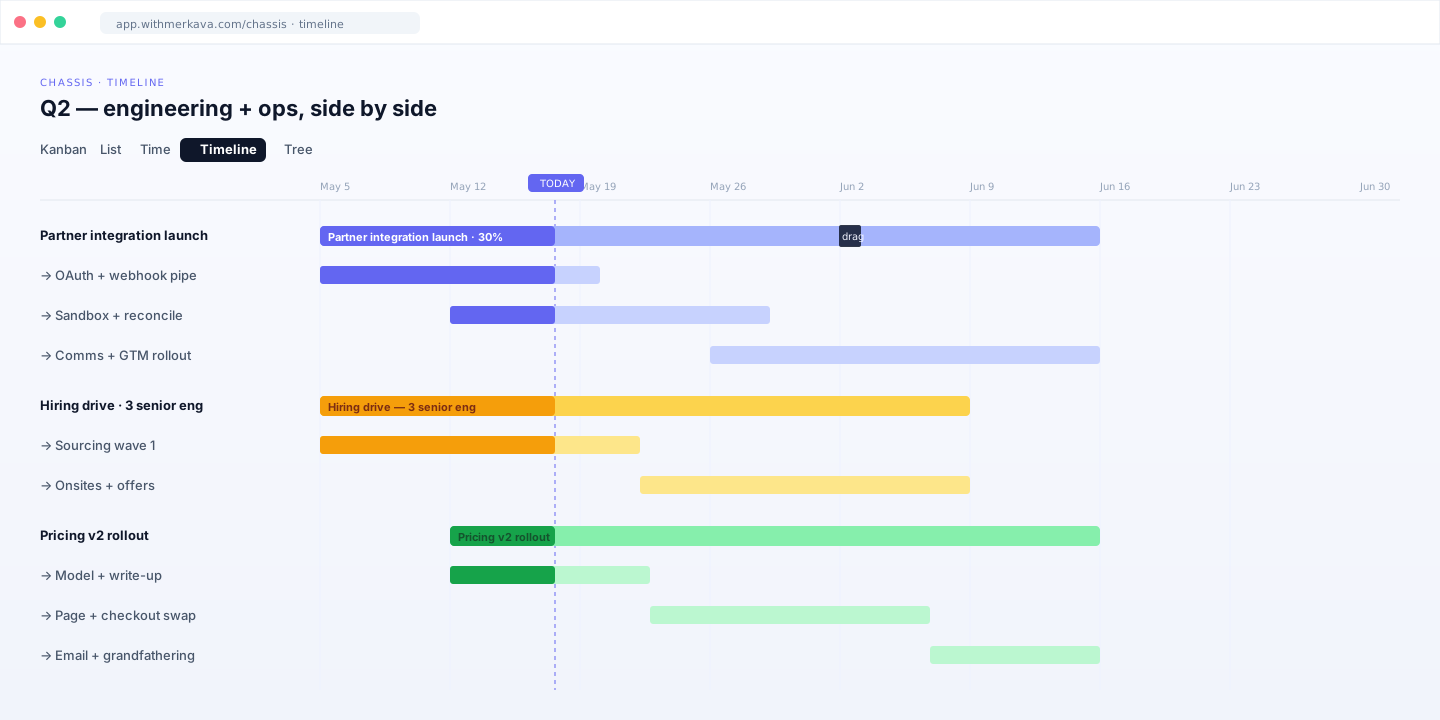
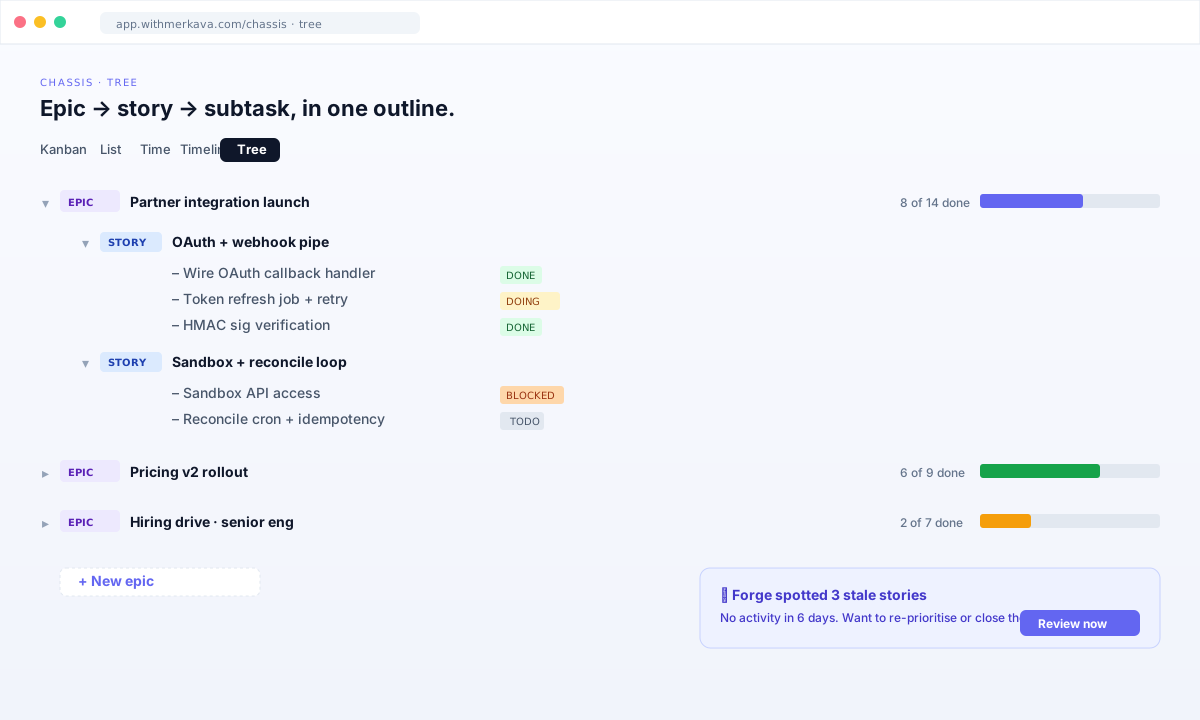
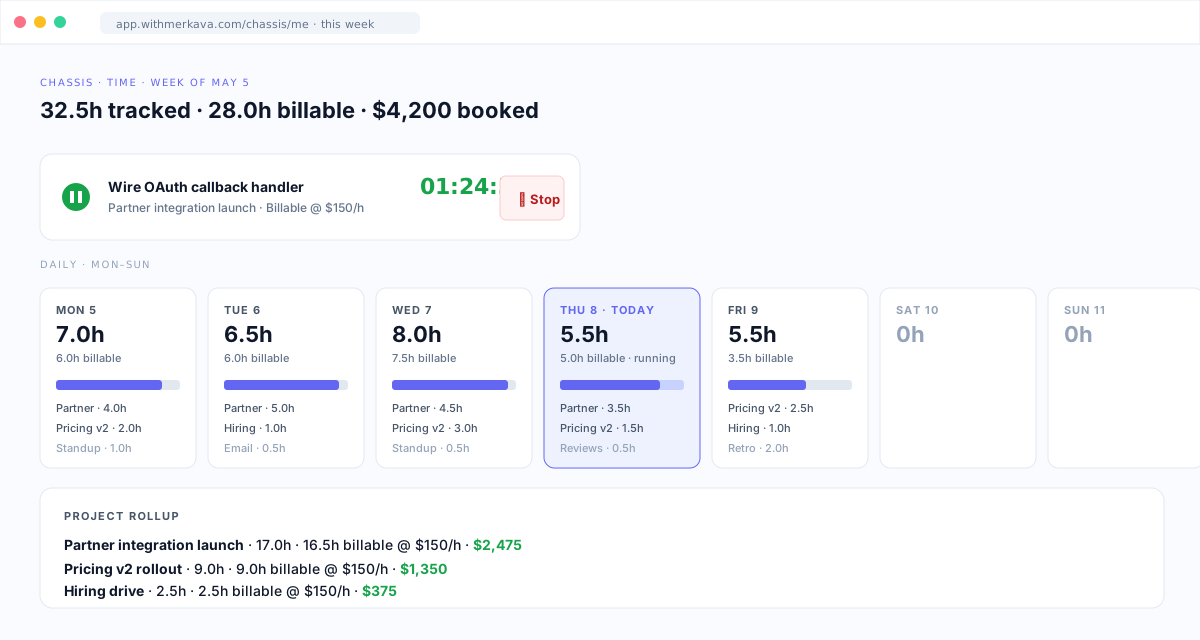
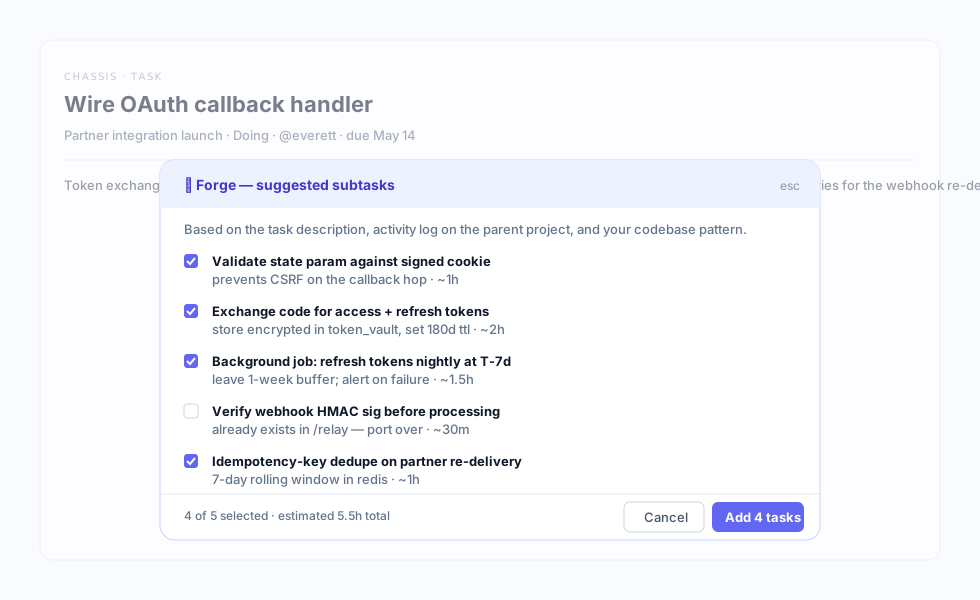
Forge AI does the parts you'd skip.
No prompt-writing. Forge is a surface, not a chatbox — it sits next to the work, ready when you need it.
Built for the way you actually run a team.
Cadence, code, and people aren't separate tools when you're running a small team. Chassis treats them as one system.
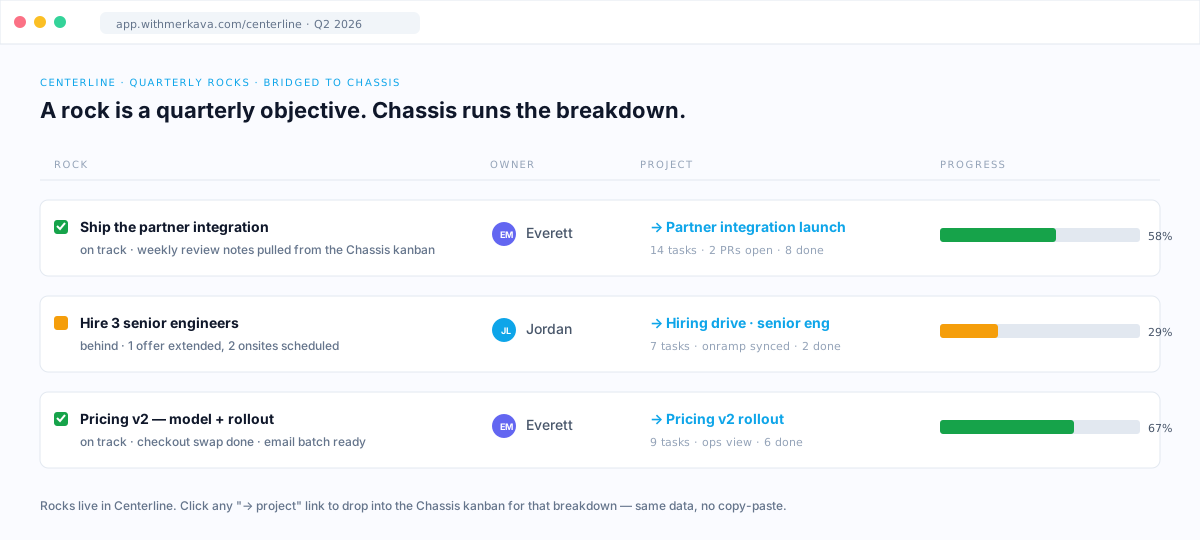
Centerline bearings become projects.
A quarterly bearing promotes straight into Chassis as a project with milestones and owners. No re-keying.
GitHub sync, both directions.
Set github_repo on a project. Import, reconcile, export, auto-close — the surface flips on.
Owners are Crew records.
One canonical person across the Dashboard. Crew, Atlas, and Gauge all read the same record.
Connect everything.
Public REST API, signed webhooks, automation rules, intake forms. Build whatever wiring your stack needs without a Zapier middleman.
Public API + intake forms.
Bearer-auth REST at /api/v1/chassis/*. Each project can publish a public intake form at /forms/:slug.
Slack-native + signed webhooks.
Point a webhook at a Slack URL — Chassis emits real Block Kit. Generic URLs get HMAC-signed JSON.
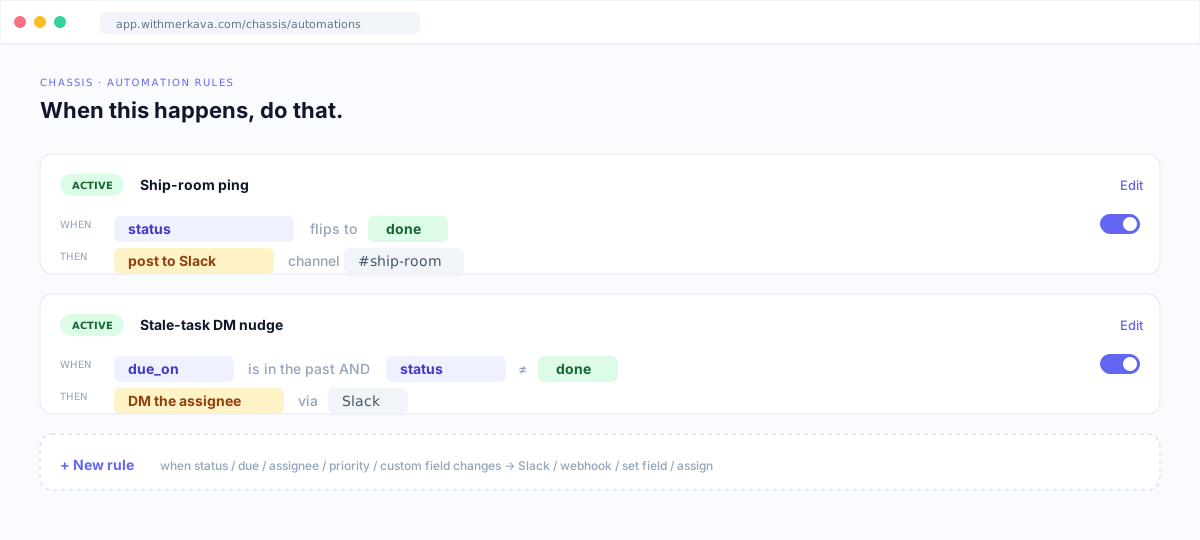
Automation rules, server-side.
When status flips, when due_on passes, when a field changes — post to Slack, DM the owner, hit a webhook, set a field.
Built for the way you work.
Read the page that describes the work you do today.
Solo operators
One person, multiple ventures. Forge digests stand in for a team standup.
Agencies
Billable hours, per-client projects, intake forms, weekly digests for clients.
Engineering teams
Tickets, sprints, PR review, deploy gates. Bidirectional GitHub sync.
Operations teams
Partnership rollouts, hiring drives, pricing changes, vendor onboarding.
Pricing.
You don't buy Chassis on its own. It comes included in a department — and the tools are the cheapest part. You're hiring the AI exec who runs the work, on one Dashboard and a shared data layer.
Run by the CTO with 3 specialists. Chassis ships its Engineering view here, alongside Atlas and Beacon. Right path for engineering-heavy teams.
Run by the COO with 8 specialists. Chassis ships here in full, alongside Centerline, Crew, Gauge, and four more. Right path for ops-heavy teams.
All six departments — Marketing, Sales, Operations, Engineering, Finance — every Drive in the box. Saves $96 vs à la carte.
If you already run the Operations or Engineering department, Chassis is already turned on. Nothing more to buy.
7-day free trial. The Dashboard is free; you only pay for the departments you run. Annual billing saves 20%.
Questions.
What is Chassis for?
Chassis is the project layer for operators running both operations and engineering. It carries projects with owners, due dates, milestones, and a four-column kanban. Use it for partnership rollouts, hiring drives, pricing changes, infra migrations, and engineering sprints in the same workspace. Centerline bearings promote into Chassis projects without re-keying.
How is the operations view different from the engineering view?
Same Drive, same data spine. The difference is one field on the project: github_repo. Leave it empty and you get the operations view. Set it and Chassis flips on the engineering surface — sync banner, GitHub issue + PR URL fields on every task, Create-GitHub-issue button per task, auto-close-on-done.
What does the GitHub sync actually do?
Four flows. Import pulls open issues and PRs from the linked repo and creates Chassis tasks for items not yet linked. Reconcile fetches GitHub state for already-linked tasks and flips them to done when an issue closes or a PR merges. Export creates a fresh GitHub issue from a Chassis task with no linked URL. Close auto-closes the linked GitHub issue when a task flips to done.
How does Chassis work with Centerline?
Centerline runs the cadence — weekly review, quarterly bearings, scorecard. Chassis runs the breakdown. A bearing is a quarterly objective; Chassis turns it into a project with tasks, milestones, and owners. The Operations department ($199/mo, run by the COO) operates Centerline + Chassis + Crew + Gauge as one system.
Will Chassis replace Linear, Asana, or Jira?
For project management inside Merkava, yes. Where Chassis wins: native to the Dashboard, Forge AI workflows ship in the box, GitHub bidirectional sync is included. Where the standalones still win: Linear's keyboard speed, Asana's integration breadth, Jira's enterprise reporting depth. See the vs-Linear, vs-Asana, and vs-Jira pages for honest broker comparisons.
What does Chassis cost?
You don't buy Chassis on its own — it comes included in a department. It's part of the Operations department ($199/mo, run by the COO) and surfaces an Engineering view inside the Engineering department ($99/mo, run by the CTO) — same Drive, two ways to get it. The tools are the cheapest part: you're hiring the AI exec who runs the work. Full C-Suite ($749/mo) includes everything. 7-day free trial. Annual billing saves 20%.
How do the Forge AI workflows work?
Forge is the AI engine inside Merkava. Inside Chassis: scaffolds a starter project from your venture profile; proposes 3–5 concrete subtasks with descriptions; writes the end-of-sprint retro automatically when a cycle closes; generates a weekly progress digest in operator voice; drives a one-click first-sprint wizard. None of these require a prompt.
Can I migrate from my existing tool?
Yes for engineering: link a GitHub repo, hit Import, and your open issues and PRs become Chassis tasks. For operations work moving in from Asana, Notion, or a spreadsheet, the lift is manual today. We will help if you ask: [email protected].
Run your projects in the Dashboard.
Sign up for Merkava and install Chassis from the Marketplace. 7-day free trial on first install.